How to fix it
Work through these in order, the most common causes come first.
How to Diagnose Where the Problem Is
The fastest way to narrow down the cause is to check three tools in sequence.
Do this before working through the full fix list, it will tell you which fixes are relevant.
Step 1, Device Manager (Windows) or System Information (Mac): check whether the computer sees the drive at the hardware level.
On Windows: open Device Manager (Win+X > Device Manager) and look under Disk Drives.
On Mac: Apple menu > About This Mac > System Report > USB.
When to Suspect Hardware Failure
Work through Fixes 1-7 before concluding hardware failure.
Data Recovery Options
If the drive has failed and contains data you need: Free options: TestDisk (open source, partition table recovery), Recuva (Windows, free version), PhotoRec (file carving by type).
These handle logical failures, corrupt partition tables, accidental formatting, filesystem errors.
Professional data recovery: DriveSavers, Ontrack, Gillware.
These handle physical failures w here the drive cannot be detected at all.
A professional lab can sometimes recover data from SSDs w here the flash chips are intact but the controller has failed.
Our picks
Products we recommend
As an Amazon Associate I earn from qualifying purchases. Picks are based on manufacturer specs, independent reviews and owner reports.
Crucial
2 Gen 2x2 SSD rated up to 2,100MB/s reads and 2,000MB/s writes, with IP55 protection.
✓ Pros
- Up to about 2,000MB/s on Gen 2x2 ports
- IP55 dust and water resistance
- Very compact
- Fast enough for 4K editing
✕ Cons
- Needs a USB 3.2 Gen 2x2 port for full speed
- Slower on Macs without Gen 2x2
- Gets warm during long transfers
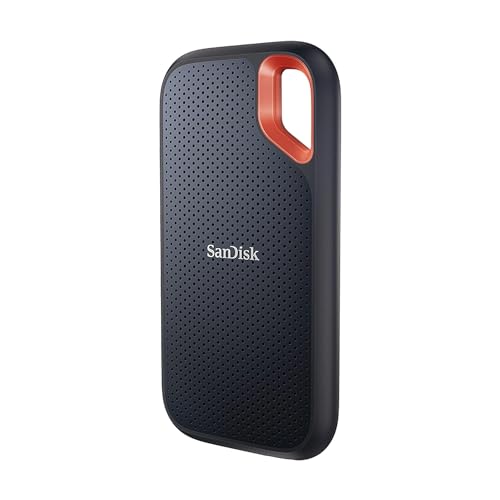
Best For Outdoor UseSanDisk
IP55 rated, survives accidental water exposure and dust in field use
- IP55 dust and water resistance
- Carabiner loop
- USB 3.2 Gen 2
- 1050 MB/s read
- Rubber housing
✓ Pros
- IP55 rated, survives accidental water exposure and dust in field use
- Rubber housing handles drops better than bare metal
- Carabiner loop for pack or belt attachment
✕ Cons
- Slightly larger than Samsung T7 for equivalent capacity
- No included USB-A cable
Lexar
A slim Gen 2x2 SSD rated up to 2,000MB/s, compatible with iPhone 15 Pro ProRes recording.
✓ Pros
- Up to 2,000MB/s reads
- Slim and light
- Works with iPhone 15 Pro for video
- Magnetic set options
✕ Cons
- Full speed needs Gen 2x2
- Less rugged than armored drives
- Gets warm
FAQ
Common questions
My portable SSD worked before but is now not recognized, what changed?
If the drive stopped working after an OS update: check for a firmware update for the SSD from the manufacturer. Windows and macOS updates occasionally change USB driver behavior that affects drive recognition. If the drive stopped working after a specific event (drop, water exposure): the drive likely has physical damage. If the drive stopped working with no apparent event: cable failure is the most likely cause, replace the cable.
Why does my SSD show up in Device Manager but not File Explorer?
A drive in Device Manager but not File Explorer has no assigned drive letter or no formatted filesystem. Open Disk Management and check the drive's status: if unallocated, create a new partition. If a partition exists with no letter, assign a drive letter. If the drive shows as RAW, use data recovery software before reformatting.
Can a portable SSD fail permanently?
Flash memory cells have a finite number of write cycles. Physical damage from drops or water can cause permanent hardware failure. Controller failures (the chip that manages the SSD) can cause the drive to stop responding entirely. Always mainta in at least one additional backup copy of important data, a single drive backup is one failure away from data loss.
Is my portable SSD dead or just not mounting?
Check in Disk Management or Disk Utility. If the drive appears in Disk Management as RAW or Unallocated, the hardware is functional and data recovery or reformatting is possible. If the drive does not appear in Disk Management at all even though Device Manager shows it: the drive's partition table is corrupted, use a partition recovery tool (TestDisk, free). If the drive does not appear anyw here even after cable and port swaps: the hardware has likely failed.
Keep researching
Related guides & comparisons
troubleshootHow to Choose a Portable SSD: 4 Steps to Speed, Durability, and SizeChoose the right portable SSD, match interface speed to your use case, understand real sustained speeds vs peak specs, choose the right capacity for your data type, and verify compatibility with your.Best picksBest Portable SSDs 2026: Samsung T7, WD My Passport, and SanDisk ExtremeOur top pick for portable SSDs is the Samsung T7 Portable SSD (Aluminum body stays cool, no thermal throttling observed in 10-minute sustained writes).Best picksBest Portable SSDs for Video Editing 2026: Speed, Sustained Write, and ReliabilityOur top pick for portable SSDs for video editing is the Samsung T7 Shield (IP65 means complete dust protection and water jets, better than IP55 on SanDisk Extreme).