How Much Write Speed Do You Need?
Short answer: for backups and photos, any modern portable SSD is fast enough. Write speed starts to matter for large video files and for recording directly to the drive.
- Documents — photos and Time Machine backups: 400 to 500 MB/s (a USB 3.2 Gen 1 or SATA-based drive) is plenty.
- 4K H.264/H.265 camera files: the bitrate is usually 100 to 200 Mbps, about 12 to 25 MB/s, so copy time, not recording, is the bottleneck. A ~1,000 MB/s USB 3.2 Gen 2 drive is a comfortable choice.
- Recording ProRes on an iPhone 15 Pro or later: Apple requires a USB 3 drive at 10 Gbps for 4K60 ProRes; choose a drive with strong sustained writes, not just a high peak.
- Editing multicam 4K or 8K directly from the drive: look at USB4/Thunderbolt drives (roughly 2,800 MB/s and up) if your computer has the port.
Check sustained write speed, not the headline number. Many drives write fast into a cache, then slow sharply on long transfers. Independent reviews that copy 100GB+ files show the real figure.
The Metric That Matters: Sustained Write Speed
All portable SSDs use a technique called SLC caching: they write data quickly to a small fast cache, then move it to the slower ma in storage in the background.
When the cache fills during a large transfer, write speed drops to the actual native speed of the drive.
A drive advertised at "1,000 MB/s" may write at 1,000 MB/s for the first 10-15GB, then drop to 200-600 MB/s for the remainder of a 100GB transfer.
What to look for: reviews that perform sustained transfer tests of 100GB+ at room temperature.
The Samsung T7 and SanDisk Extreme both susta in close to advertised speeds due to adequate cache sizing and thermal management.
Connection Protocols: USB vs Thunderbolt
USB 3.0 / USB 3.1 Gen 1 (5 Gbps): limits transfer speed to approximately 500 MB/s.
Most current portable SSDs (USB 3.2 Gen 2) are backward compatible with these ports but run at reduced speed.
USB 3.2 Gen 2 (10 Gbps): the standard for current portable SSDs.
Real-world limit approximately 1,000-1,050 MB/s.
Available on most modern laptop USB-C ports.
NVMe vs SATA: What Is Inside
Portable SSDs use either NVMe or SATA internally: NVMe: current generation.
Higher speeds, lower latency.
All portable SSDs rated above 500 MB/s use NVMe internally.
Samsung T7, SanDisk Extreme, WD My Passport SSD, Crucial X8, all NVMe.
Limited to approximately 550 MB/s internally.
IP Ratings Explained
IP ratings certify protection against solids (dust) and liquids: IP55: protected against dust in most conditions (not fully dust-tight) and water jets from any direction.
Adequate for ra in and splash.
IP65: fully dust-tight and protected against water jets.
SanDisk Extreme Pro and Samsung T7 Shield use IP65.
IP67: dust-tight and can be submerged in up to 1 meter of water for 30 minutes.
Capacity Sizing
250GB: adequate for a working project drive when you transfer files off regularly.
Not appropriate as a primary backup drive.
500GB: good for a project drive or secondary backup for phones and cameras on a short trip.
Fits most active project libraries plus backup of a laptop's important files.
Most users buying a portable SSD should buy 1TB.
Compatibility
All current portable SSDs work on: Windows (all versions with USB 3.0+ support) macOS (requires formatting as exFAT for cross-platform use, or APFS for Mac-only) Linux (exFAT support requires exfat-utils package on some distributions) iPad Pro and iPad Air (USB-C models)
Encryption: Do You Need It?
Hardware encryption (AES-256) on Samsung T7, SanDisk Extreme, WD My Passport SSD is a meaningful feature if: You carry client data, financial records, or personal files on the drive The drive could be lost or stolen in transit Encryption requires software setup (manufacturer-specific) and adds a password prompt each time the drive is connected.
If you forget the password, all data is gone, t here is no recovery.
For drives that stay in your home or office: encryption is optional.
For drives that travel with you: consider enabling it.
One Thing to Check Before Buying
Before purchasing a portable SSD, check which USB generation ports your laptop actually has.
On many older Windows laptops, the USB-A ports are USB 3.0 / 3.1 Gen 1 (limited to ~500 MB/s), and t here may be only one USB-C port that supports USB 3.2 Gen 2.
A Samsung T7 connected to a USB 3.0 port transfers at ~500 MB/s, exactly the same as a drive rated at 550 MB/s peak.
The bottleneck is the port, not the drive.
Check your laptop spec sheet for USB version.
Our picks
Products we recommend
As an Amazon Associate I earn from qualifying purchases. Picks are based on manufacturer specs, independent reviews and owner reports.
Crucial
2 Gen 2x2 SSD rated up to 2,100MB/s reads and 2,000MB/s writes, with IP55 protection.
✓ Pros
- Up to about 2,000MB/s on Gen 2x2 ports
- IP55 dust and water resistance
- Very compact
- Fast enough for 4K editing
✕ Cons
- Needs a USB 3.2 Gen 2x2 port for full speed
- Slower on Macs without Gen 2x2
- Gets warm during long transfers
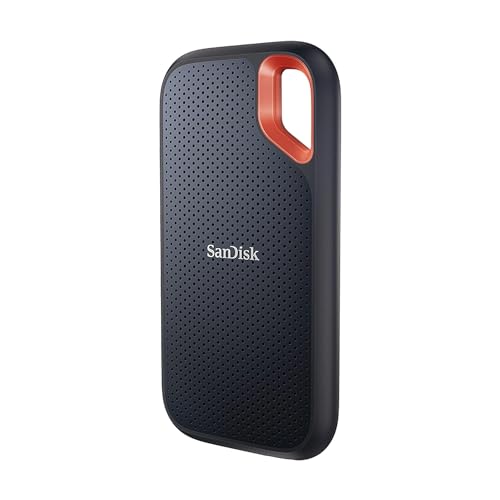
Best For Outdoor UseSanDisk
IP55 rated, survives accidental water exposure and dust in field use
- IP55 dust and water resistance
- Carabiner loop
- USB 3.2 Gen 2
- 1050 MB/s read
- Rubber housing
✓ Pros
- IP55 rated, survives accidental water exposure and dust in field use
- Rubber housing handles drops better than bare metal
- Carabiner loop for pack or belt attachment
✕ Cons
- Slightly larger than Samsung T7 for equivalent capacity
- No included USB-A cable
Lexar
A slim Gen 2x2 SSD rated up to 2,000MB/s, compatible with iPhone 15 Pro ProRes recording.
✓ Pros
- Up to 2,000MB/s reads
- Slim and light
- Works with iPhone 15 Pro for video
- Magnetic set options
✕ Cons
- Full speed needs Gen 2x2
- Less rugged than armored drives
- Gets warm
Keep researching
Related guides & comparisons